A real 3D arrow puzzle
Every level is a cube of arrows pointing along six directions. Tap one to fire it off, but it only leaves when its straight path is fully clear. Find the order that unjams the whole cube.
A 3D arrow puzzle game. Tap an arrow to send it flying, clear the path, and empty the cube. 1000 levels from Easy to Expert, plus Random Dense and a Daily 3D Cube. Free, one hand.
No install needed — runs in any browser.
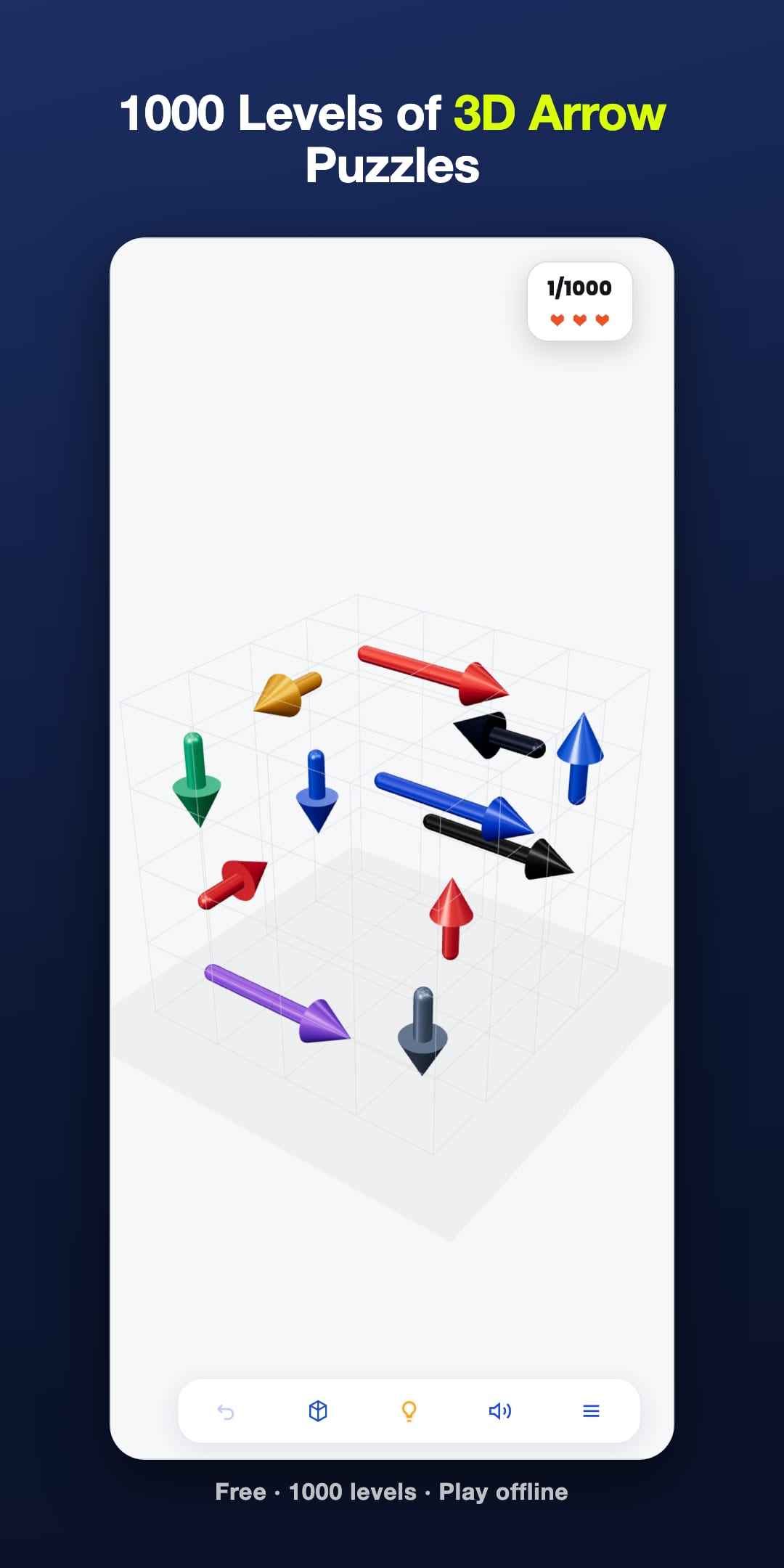
An arrow puzzle game asks you to tap arrows in the right order so each one flies out freely. Arrow Jam 3D wraps the puzzle around a cube you can turn, with 1000 levels. It is for fans of short logic puzzles. Every board is built by adding arrows in reverse, so it can always be solved.
Click any screenshot to zoom in for a full-size view.
An arrow puzzle game on a cube: tap an arrow to fire it, clear its path, and unjam the whole stack. 1000 levels in four tiers, a Random Dense mode and a Daily 3D Cube.
Every level is a cube of arrows pointing along six directions. Tap one to fire it off, but it only leaves when its straight path is fully clear. Find the order that unjams the whole cube.
Easy, Medium, Hard and Expert, 250 levels each. Cubes grow from 4x4x4 with a dozen arrows to 10x10x10 with up to 260, so the chains you have to read ahead get longer as you go.
Past the campaign, Random Dense builds a fresh 8x8x8 cube every time, and the Daily 3D Cube is the same board for everyone that day, with a replay to beat your own time.
Levels are generated with a guaranteed solution, and restarting a campaign level gives you the same board again (Random Dense and challenge boards deal a fresh one). A level that feels impossible has a blocker you have not rotated into view yet.
Tap a blocked arrow and you lose one of three lives, but the arrow in its way flashes so you learn something from the mistake. In the app, a short ad lights up the arrows that can leave right now for that level.
Look at how the arrows point and overlap. Rotate to see the chains hidden behind the front row.
Tap an arrow to send it flying. It only leaves if its path is clear — so clear the blockers first.
Unjam every arrow and clear the cube to finish the level, then move on, or try Random Dense or the Daily 3D Cube.
Arrow Jam 3D is the ideal arrow puzzle game app for anyone who wants a fast, reliable tool on your phone.
Arrow Jam 3D is an arrow puzzle game wrapped around a cube: tap an arrow to send it flying, but it only leaves when its path is clear. 1000 levels from Easy to Expert, a Random Dense mode, a Daily 3D Cube, and every board is guaranteed solvable. Free, one-hand play.
Whether you need it for work, travel, or daily use, Arrow Jam 3D delivers a simple experience with no clutter.
An arrow puzzle game gives you a board of arrows that can only move the way they point: tap one and it leaves, but only if nothing blocks its path. Arrow Jam 3D is an arrow puzzle game built on a cube, so every level asks which arrow frees which, and what is hiding on the side you cannot see.
Every level is a small cube packed with arrows pointing along six directions. The puzzle is the order. Early levels teach you to read the chains; later ones hide the key arrow three or four moves deep, on a face you have not turned towards you yet.
The controls are one thumb. The thinking is not. The 1000 campaign levels come in four tiers of 250. Easy starts on 4x4x4 cubes with about a dozen arrows. Expert ends on 10x10x10 cubes with up to 260. The arrow count climbs steadily inside each tier, so the next level usually looks a little harder than the last rather than suddenly impossible.
Tap an arrow whose path is blocked and it stays where it is, you lose one of three lives, and the arrow in its way flashes. That flash is the most useful thing in the game: it shows you the blocker you missed. Lose all three lives and the attempt ends. You can undo your last move once for free, or start again: a campaign level rebuilds the identical cube, while Random Dense and challenge boards deal a fresh one. There is no countdown clock on a level and no energy bar to refill, so you can sit on one cube for as long as you like.
The hint glow marks the arrows that can leave right now. In the app it starts off on every level, and a short ad turns it on for that level; in the browser version you can switch it on and off freely.
The whole game runs on one rule: an arrow only leaves when the straight line in front of it is empty. Everything else follows from that.
Every board is generated with a guaranteed solution, so a level that feels broken is a level with a layer you have not rotated into view.
Most arrow puzzles give you a flat grid. Every arrow is visible, every path is visible, and the only thing you are solving is the order to tap in. That is a real puzzle. It is just a puzzle of one kind, and once you have learned to scan a grid, the difficulty has nowhere left to go except making the grid bigger.
Wrapping the same rule around a cube changes what you are actually solving. The front face hides whatever is behind it, so the first thing a level asks is not which arrow first but what am I not looking at. An arrow that reads as hopelessly blocked from the front is frequently clear from the side. Rotating is free and costs no move, so the skill the game rewards is patience with the camera before commitment with the thumb.
What is the same as a flat arrow puzzle: one rule, one tap, no tutorial to read. What is different: you have to look before you tap, and looking is a move the game does not charge you for.
People arrive at arrow puzzles from two different games, and they are not the same game.
In a sliding-block puzzle, the Unblock Me family, you drag pieces along fixed tracks until one of them has a clear lane to the exit. The move is a drag, the board is a flat tray, and a piece can be nudged part-way.
In Arrow Jam 3D you never drag anything. You tap an arrow and it fires off in the direction it already points, and it leaves only if the straight line in front of it is completely clear. There is no part-way: an arrow either goes or it does not. The board is a cube you rotate rather than a tray you look down on.
What survives from one to the other is the habit of mind: find the blocker behind the blocker, and clear them in the right order. What does not survive is the input. If you came looking for sliding blocks, this will feel wrong in the first thirty seconds, and it is better to know that now than after the download.
Finishing the campaign does not end the game. Random Dense builds a fresh 8x8x8 cube with up to 56 arrows every time you start it, each one generated with a guaranteed solution. The Daily 3D Cube is one board for everyone each day, sized by the day of the week, and you can replay it to beat your own time. You can also send a friend a challenge link that opens exactly the same cube.
The split is deliberate. The campaign climbs in steady steps because that is what teaches you to read chains. The random boards are where you find out whether you learned it, or only remembered specific cubes.
Arrow Jam 3D is free and has no in-app purchases: nothing to unlock and nothing to buy. It is paid for by ads, including some between levels. After the first launch, the game keeps a saved copy on your phone, so it opens without a connection on a plane or the metro. The first launch needs one.
Arrow Jam 3D is made by Teamz Lab, a small UK studio. If you like this one, the same team ships Rocket Landing: Moon Lander, Golf Solitaire, Scorpion Solitaire, and Forty Thieves Solitaire, all of them on our games page. One more is not out yet: the poker trainer is a free browser prototype where you answer real Texas Hold’em decisions and get a Poker IQ score, playable today with no download and no money. And if you want the opposite of a logic puzzle, Kintsugi Pottery: Goldmend is the slow one: you throw clay on a wheel, fire it, and trace the cracks the kiln leaves with gold, because every crack you mend adds to what the pot sells for.
We also build games and apps under contract. If you want a puzzle game, a 3D or physics build, or a cross-platform Flutter app for your own brand, we take client work through our Upwork agency profile, with milestone escrow, so money only moves when you approve the deliverable. Shipped work is on our portfolio.
Last updated
This app was built by Teamz Lab. Need a custom app? Hire us on Upwork.
Hire Teamz Lab on Upwork