Why is my resume getting rejected before a person reads it?
Resume Coach is an ATS resume checker: it shows you what an applicant tracking system keeps from your resume file, scores that out of 100, and lists each problem with a fix. The first check runs on your phone with no account, so you can see what the filter sees before you apply.
Most companies run applications through software first. That software pulls the text out of your file, sorts it into fields such as contact details, experience and skills, and scores or filters what it finds. You never see that step. You see an application go out and then silence, and silence tells you nothing about whether a person read the resume or a parser dropped half of it.
A resume can look perfect and still read badly. A phone number placed in the page header may never reach the filter. A heading with a creative name may not be recognised as a heading at all. Text laid out in columns or a table can come out in the wrong order. Decorative bullet characters can arrive as noise. None of that is visible on the page you are looking at.
The X-ray: watching a parser read your page
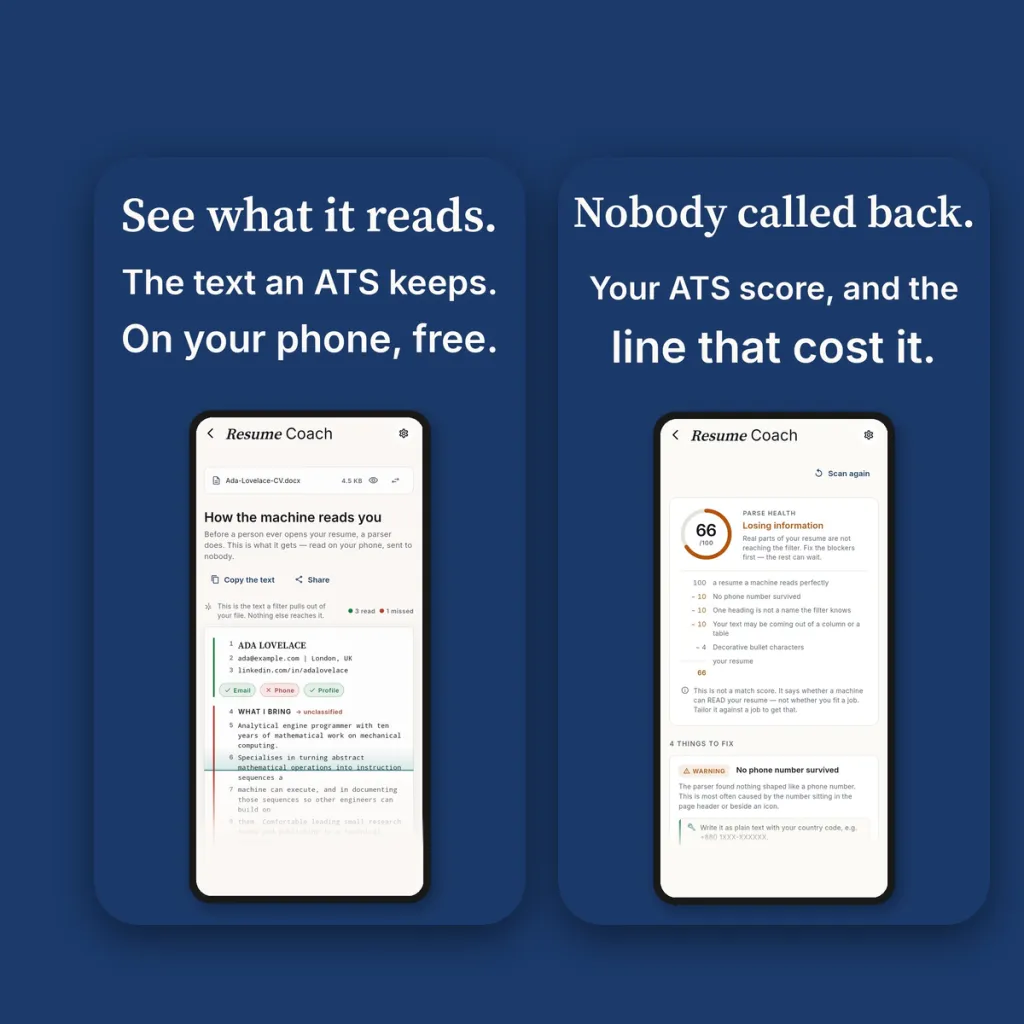
Choose a PDF or DOCX and Resume Coach runs what it calls the X-ray: an animated scan travels down your actual page. Words the software managed to extract go dark, each section gets a found or missed mark, and any line it could not handle picks up a red strike at the moment the scan passes it. A key beside the page explains every mark. Next to it sits the plain text a filter pulls out of your file, and a count of what was read and what was missed, so you can see the loss instead of guessing at it.
It also accepts other formats: text, Markdown, RTF and ODT files work. It cannot read a photo or a scanned image of a resume yet, because there is no text in an image to extract. If you do not have a resume yet, there is a blank form to start from.
The check runs on your phone, before any account exists. It imitates the way this kind of software pulls text from a file; it is not connected to any employer’s system, and the app says so.
A score with its working shown
The result is a parse health score out of 100. Rather than just a number, the screen prints the sum the way a receipt would. It starts at 100 for a resume a machine reads perfectly, then subtracts a set amount for each problem: no phone number survived, one heading is not a name the filter knows, your text may be coming out of a column or table, decorative bullet characters. You can check the arithmetic, and you can see which single change would move the score most.
The note under the score matters as much as the number. This is not a match score. It tells you whether a machine can read your resume, not whether you suit a job. Those are two different questions, and a resume can pass one and fail the other, so the app keeps the two scores apart.
Each finding below the score arrives as an instruction. The fix comes first in plain words, and the explanation sits below it for anyone who wants it. Findings are labelled by severity as a blocker, a warning or a note, using a word as well as a colour, so the label still reads for someone who is colour-blind or looking at the screen in bright light.
How to tailor your resume to a job description
Tailoring is the second half of getting past the filter. A clean file that never uses the words of the job post can still rank low, and a generic resume sent to fifty posts reads like one. The method is simple to say and slow to do by hand: list the requirements the post repeats, find the line in your history that answers each one, put those lines near the top in words close to the post, and cut what this job does not care about.
Resume Coach does the slow part with you. Paste the job post, or open the job page inside the app and let it read the page. It matches your resume to the post and shows each requirement your record answers, with the line from your resume that answers it. You get a resume and a cover letter written from your own record rather than from a template with your name dropped in, and you can switch between the two on one screen.
The part worth noticing is what it will not do. If a posting asks for something your history does not show, such as a location you have never worked in or a number of years you do not have, the application holds it back and tells you why, rather than writing a claim you would struggle to back up at the interview. What cannot be answered stays visibly unanswered. The interview prep screen follows the same rule, with a section on what you cannot claim.
Changing careers
A cover letter for a career change has a harder job: it has to show which skills carry over without pretending to experience you do not have. Because Resume Coach is instructed to write only from your record, it is told not to invent a background in the new field, and the gaps it shows you are the ones an interviewer would find anyway. The format quiz also asks where you are in your career, and if you say you are changing fields it recommends a skills-first layout with your work history kept underneath.
The rest of the search
A job search is mostly waiting, so the app gives that a home. The application tracker lists what you sent, where and when, groups it by status, and counts the ones that have gone quiet. An application with no reply after about three weeks is marked as gone quiet, plainly. There is no confetti and no invented momentum, because most of a job search is rejection and a tracker that hides the silence is lying by omission. You can set a reminder on any application.
Interview prep builds likely questions from the job post, and the app is plain that they are likely, not certain, because nobody knows what will really be asked. A master profile keeps your jobs, dates, what you did and your skills in one place. It is filled from your resume one time, every new resume draws on it rather than on an empty page, and the app shows how complete the profile is.
When a document is finished, you can page through it on screen first and then save or share it as a PDF for application portals, a DOCX for a recruiter who wants to edit it, or plain text for forms that strip formatting. The format screen recommends one layout and gives its reasons, with the others to compare. All 11 layouts are built as single-column, ATS-safe templates.
What it costs and what it keeps
The X-ray, the score and the fixes are free and need no card. Your first job-matched resume is free too. After that, matching a resume to a job costs 3 credits, and each rewrite or interview prep costs 1, so you pay for the AI work and not for the check. Job-matched resumes and cover letters need you to sign in, because credits live on your account.
On privacy, the file is read on your phone. When you are signed in, the text extracted from your resume is saved to your account so you can tailor it later; the file itself is not stored.
What Resume Coach is not
It is not a job board and it will not find you vacancies. It does not claim to know any employer’s actual system, because it cannot. And it does not promise an interview: nobody can. What it gives you is the view that has been missing, which is what the software sees, and a way to fix what you can before you send the application.