AI Product Image Generator With a Product Lock for Sellers

Upload one phone photo and get marketplace-ready listing photos. Tell the AI what must stay exact, and in the Guided and On a model studios a fidelity check flags results that drifted.

An AI product image generator is only useful if the product still looks like yours. AI Product Studio turns one phone photo into listing photos for Etsy, Shopify or Amazon, in your browser. It is for small online sellers. Its Product Lock tells the AI what must stay the same: colour, shape, logo or material.

17Product categories, each with its own scenes
9Marketplace and social export presets
EN / বাংলাBilingual interface

Etsy, Shopify, Amazon, Instagram, Facebook, WhatsApp, Daraz, Bikroy and Google Gemini are trademarks of their respective owners. AI Product Studio is independent software and is not affiliated with, endorsed by, or sponsored by any of them.

AI Product Studio app screenshots

Click any screenshot to zoom in for a full-size view.

The Quick tab of the studio: one upload box ("Upload or take a product photo"), an optional "What is it?" category picker listing Jewelry, Clothing, Shoes, Bags and more, and a row of tabs for Quick, On a model, Guided, Bulk clean-up, Upscale and Image to Prompt.
The "On a model" tab, where you add a photo of your product and either a photo of a person or a ready model look, with an on-screen note that the studio keeps your product colour, print and logo exact.
The Bulk clean-up tab: pick what the products mostly are, upload several product photos at once, and get one clean white-background photo for each. The screen is empty until you upload.
The Product Lock section of the public front page, showing a passed result ("Logo preserved, color matched, approved") and a rejected one ("Chain distorted"), plus the four things you can lock: colour, shape, logo and text, material. These two lines are illustrative examples.
The sample gallery on the front page: a white-background kurti, a saree and a panjabi shown on models, each tagged "kept". These are demo images that the page itself labels as previews, not photos of a customer product.
The Quick tab on a phone-sized screen: a single large upload box with a "Take a photo" link, then the category chips, so the whole flow works with a plain phone photo.
The Upscale tab on a phone-sized screen: upload an image, choose to enlarge it 2x or 4x, and tap Upscale. It makes the image bigger and crisper right in your browser.

Features

AI product image generator for online sellers: upload one phone photo and get a marketplace-ready listing photo set, with a Product Lock that tells the AI what must stay the same.

Product Lock

Choose what must stay exactly the same (colour, shape, logo and text, material) and set the strictness to Loose, Balanced or Strict. At Strict the model is told to treat the product as a fixed object and only re-light and re-stage it. It is an instruction, not a guarantee, so check each photo.

A fidelity check in the single-photo and on-model studios

In the Guided single-photo studio and the On a model studio, each generated photo is compared with your original on colour drift, silhouette overlap and fine-detail retention. A result that drifted is flagged for a second look, and you can make a new variation in one tap.

Shots matched to what you sell and where you post

Two questions drive the set: 17 product categories (jewelry, clothing, shoes, beauty, electronics, furniture, food and more) and the place you will post. Etsy, Shopify, Amazon, Instagram, Facebook or plain clean photos, and Daraz, WhatsApp catalog and Bikroy in the Bangladesh view.

On-model clothing photos

Show a saree, panjabi, kurti or any garment worn by a person. Add a photo of a model or pick a ready model look. The studio is upfront that clothing can need one retry.

Your logo and sale badge, stamped on cleanly

Add your logo as a watermark and a text badge such as SALE or NEW. These are composited on the finished photo after generation, so a logo is never redrawn by the AI. Optional HD 2x export, and an in-app editor to adjust a result.

Bulk clean-up and a free enlarger

Upload many products at once and get one clean white-background photo for each, or enlarge any image 2x or 4x right in your browser, free.

How it works

  1. 1. Tell it what you sell and where you post

    Pick a product category and a destination such as Etsy, Shopify, Amazon, Instagram, Facebook or clean photos. That choice decides which scenes and export sizes you get.

  2. 2. Upload one photo and set the lock

    A plain phone photo is enough. Choose what must stay exact and how strict to be. Add a logo or sale badge if you want one.

  3. 3. Review, redo and download

    Look at each result against your original (the Guided and On a model studios also run a fidelity check), make a new variation for any shot that looks off, then download the photos sized for your channel.

Perfect for you

AI Product Studio is the ideal ai product image generator for anyone who wants a fast, reliable tool in your browser.

AI Product Studio turns one plain phone photo of your product into a set of listing photos for Etsy, Shopify, Amazon, Instagram, Facebook, Daraz and more. You choose what must stay exact (colour, shape, logo, material), and in the single-photo (Guided) and On a model studios each result is checked against your original so a drifted photo gets flagged before you post it. Runs in your browser.

Whether you need it for work, travel, or daily use, AI Product Studio delivers a simple experience with no clutter.

What is an AI product image generator, and which one tries to keep your product true?

An AI product image generator turns a photo of a product into listing images. AI Product Studio does this from one phone photo: you say what you sell and where you will post, and it makes white-background, studio, lifestyle and on-model shots while a Product Lock tells the model to keep your product’s colour, shape, logo and material unchanged.

Most AI image tools are built to make a beautiful picture. A seller needs something different: a believable picture of the exact thing the customer will receive. If the colour shifts, a logo melts or a chain bends, the photo sells a product that does not exist, and the cost shows up later as returns and one-star reviews. AI Product Studio is built around that problem: your real product is the thing it tries hardest not to change.

Two questions, then one photo

The setup is deliberately short. You answer two questions and the studio tailors everything after that.

  1. What are you selling? There are 17 categories, from jewelry, clothing and shoes to beauty, electronics, furniture, food and drink, toys, pet products and handmade items. The category decides which scenes make sense. A ring suits a close-up or an on-hand shot, a mug suits a table, and a sofa suits a room.
  2. Where will you post it? Etsy, Shopify, Amazon, Instagram, Facebook, or just clean photos. This decides the shots and the export sizes. In the Bangladesh view, Daraz, WhatsApp catalog and Bikroy replace the global marketplaces, and Eid and Pohela Boishakh scenes are offered.

Then you upload one photo. A plain phone photo is fine, and the tool suggests a simple background and good light because a clear original gives the model less to guess.

Product Lock: choose what must not change

The part most tools skip is the lock. Before you generate, you pick what has to stay exactly the same: colour, shape, logo and text, and material. You also pick how strict to be. Loose allows more creative scenes and lets the product shift a little, Balanced keeps shape and proportions, and Strict tells the model to treat the product as a fixed object it may only re-light and re-stage.

Under the hood the lock becomes explicit instructions to the image model. Instructions are not enforcement, which is why the fidelity check below exists, but the lock is the reason this product is not just a prompt box in a nicer wrapper.

A fidelity check on your results

Instructions are not proof, so in the Guided single-photo studio and the On a model studio each generated photo is also measured against your original. The check looks at colour drift in the product region, how much the silhouette overlaps the original, and whether fine detail such as logos and edges survived or went soft. A result that looks fine on all three is marked as true to your product. One that drifted is flagged with a short reason, and you can make a new variation or keep it if it looks right to you.

Be clear about what this is. It is a safeguard that catches the common failures, not a guarantee, and scenes where the product legitimately moves, such as lifestyle and on-model shots, are judged more loosely on shape. The one-tap Quick tab and Bulk clean-up do not run this check, so look at those photos closely before you list them.

What you can make

  • Marketplace sets. White-background main images, studio and lifestyle scenes, close-ups and packaging shots, sized for the channel you picked.
  • On-model clothing photos. Add a photo of your garment and either a photo of a person or a ready model look. The studio says plainly that clothing can need one retry.
  • Your logo and a sale badge. Upload a PNG logo and add a badge such as SALE, NEW or BESTSELLER. These are placed on the finished photo by the app, not drawn by the AI, so they stay crisp. There is an optional HD 2x export and an in-app editor.
  • Bulk clean-up. Upload many products and get one clean white-background photo for each.
  • Upscale. Make an image 2x or 4x bigger and crisper, free, right in your browser.

White-background, Etsy and Amazon listing photos

Most sellers searching for AI product photography want one of three things: a clean product shot on a white background, a full Etsy listing set, or images that pass a marketplace’s main-image rules. Each is a preset here, chosen by the destination you pick:

  • Just clean photos exports one strict pure-white, centred image at 2000px.
  • Amazon starts with a pure-white main image, then context, close-up and lifestyle shots, all square at 2000px.
  • Etsy builds a studio first photo, a white-background shot, a context shot, a close-up, a lifestyle scene and a packaging shot.
  • Shopify gets square, zoomable 2048px media plus a wide hero.

One caution: a marketplace main image usually has to show the actual product with no added text or marks, so do not use a watermarked trial photo, or a photo the fidelity check flagged, as your main image. Read the marketplace’s current image rules before you list.

How it works in practice

Open the studio in your browser, choose a category and a destination, upload your photo and set the lock. The studio generates the set (in the Guided and On a model studios, each photo comes with its fidelity result), and lets you zoom, download, share to WhatsApp or make a new variation for any single shot. Signed-in photos are saved to your library so you can come back to them.

The interface is available in English and in Bangla, and it follows your browser language on the first visit, with a toggle to switch.

Free trial, sign-in and pricing

You can explore the whole studio without an account. Real generation needs a sign-in, which is how a small free trial of watermarked photos stays attached to you and how your results reach your library. Without signing in you will see demo samples, not photos of your product. Paid plans or packs follow the trial. Pricing is still being tested and is shown on the site, so this page does not quote numbers.

Where it is honest about its limits

AI Product Studio is a young product, and its features and pricing are still changing. It is not a video tool, and it is not a replacement for a photographer when you need a complex multi-product scene or a model wearing a very detailed garment under tricky light. On-model photos are the least predictable shots. Free-form scene requests can also produce results that need a second try. The design goal is simple: when a photo is wrong, tell the seller, rather than hand over something pretty that does not match the product.

Try it on your own product

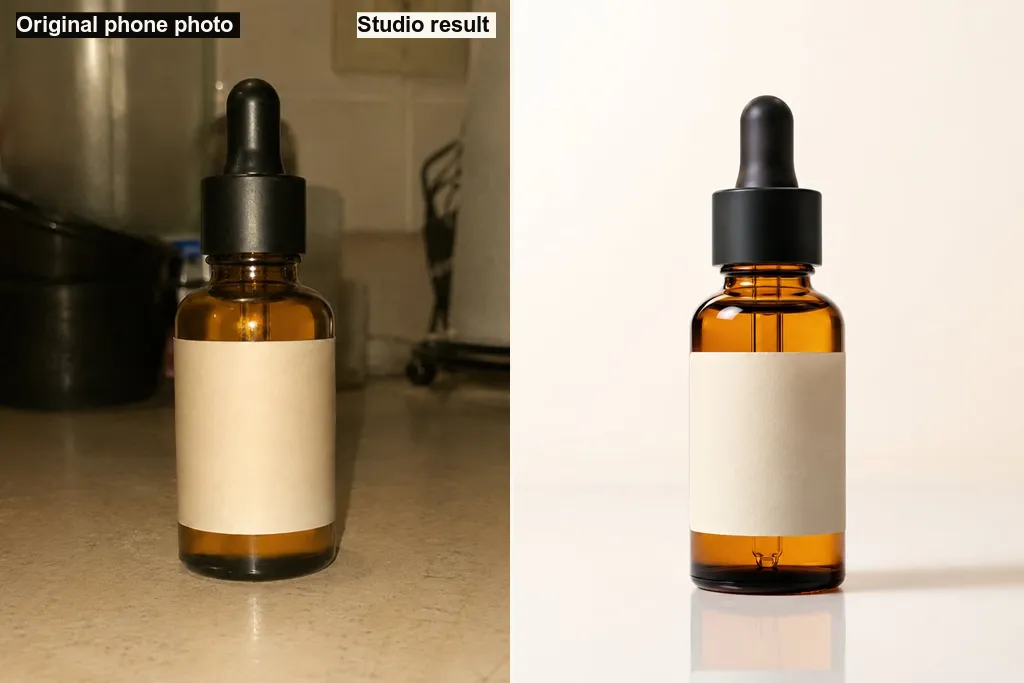
If you sell online and your current photos are dark, cluttered or inconsistent, the quickest test is to upload the worst one and compare the result with the original. Open AI Product Studio to try it in your browser.

If you are building a product like this for your own shop or catalogue, with an AI model wrapped in automatic quality checks, that is the kind of work Teamz Lab takes on through Upwork, where payment sits in escrow until you accept each milestone.
AI Product Studio processes the product photos you upload. To generate results, an uploaded photo is sent to a third-party AI image model (currently Google Gemini, accessed through OpenRouter). Photos you generate while signed in are saved to your own library, and the storage rules limit read and write access to your own account. Sign-in is handled by Firebase Authentication. Free-trial usage is counted per signed-in email.

AI Product Studio runs in the browser. It asks for a file you choose to upload, or the camera only if you tap "Take a photo", and no other device permissions.

Frequently asked questions

What is an AI product image generator?
An AI product image generator takes a basic photo of a product and produces new, polished images of it, such as a white-background main image, a studio shot or a lifestyle scene. AI Product Studio is one for online sellers: you upload a single phone photo, and it builds a set of listing photos while trying to keep the product itself unchanged.
How does AI Product Studio try to stop the AI from changing my product?
In two ways. First, the Product Lock tells the image model what must stay fixed (colour, shape, logo and text, material) and how strict to be. Second, in the Guided single-photo studio and the On a model studio, each result is compared with your original on colour drift, silhouette overlap and fine-detail retention, and a photo that drifted is flagged so you can make a new variation. The one-tap Quick and Bulk clean-up tabs do not run this check. It is a safeguard, not a guarantee, so always look at the photo before you list it.
How do I get product shots on a white background without a studio?
Take a plain, well-lit phone photo of the real product, front-facing, with its label or logo visible if you want them kept; a clear original gives the model less to guess. Then pick the white-background shots: the Amazon set starts with a pure-white main image, and the "Just clean photos" option exports one strict pure-white, centred, 2000px image. Bulk clean-up does the same for many products at once.
What product photos does an Etsy or Amazon listing need, and what sizes does it export?
Each destination is a preset. The Etsy set is a studio first photo, a white-background shot, a context shot, a close-up, a lifestyle scene and a packaging shot at 2000px. The Amazon set is a pure-white main image plus context, close-up and lifestyle shots, square at 2000px. Shopify gets square 2048px media, and Instagram, Facebook, Daraz, WhatsApp catalog and Bikroy have their own crops. Check each marketplace's current rules before you list, because they change.
Is there a free AI product image generator option, and what does it cost?
Signing in gives you a small free trial of real photos, and the trial photos carry a small watermark. After that there are paid plans or packs. Pricing is still being tested and is shown on the site, so this page does not quote it.
Do I have to sign in?
You can browse the studio and set everything up without an account. Signing in is needed at the point where you generate real photos, so your free trial stays yours and your results can be saved to your library. Without signing in, the studio shows demo samples instead of photos of your product.
Can I add my logo or a sale badge to the photos?
Yes. You can upload a PNG logo and add a text badge such as SALE, NEW or BESTSELLER. Both are placed on the finished photo by the app after generation, so the logo is pixel-exact rather than something the AI tries to draw. There is also an in-app editor and an optional HD 2x export.
Where do my photos go?
Your original photo is sent to an AI image model to generate the results, which currently runs through Google Gemini via OpenRouter. Photos you generate while signed in are saved to your own library, and the storage rules limit access to your account. If your product or photos are confidential, read the privacy policy before uploading.

Last updated

Share this app

Open the app

AI Product Studio was built by Teamz Lab. Need an AI image or photo-processing product for your own marketplace, shop or catalogue, with automatic quality checks around the model? Hire us on Upwork.

Hire Teamz Lab on Upwork

Built by